|


This tutorial is from Mabel who I thank for
letting me translate their tutorials.

Original here

Tubes

Material

My images: Here
Plugins
AP [Lines] - Foto Frame
You can find these plugins on the websites of:
Renée
Cloclo
You can also find this tutorial translated into these languages:
(Click on the flag)


|
Notes:
> Open the material / Duplicate (shift+d) / Close the originals
> Change the blend mode of the layers to match their colors.
> In older versions of PSP, Mirror Horizontal=Mirror / Mirror Vertical=Flip /
Pick tool=deformation
> Open the masks in psp and
minimize
>Adjust the size of the tubes according to your images
|
SCRIPT
Required Images:
1 female tube
*
Open a new transparent image with
900x700 pixels
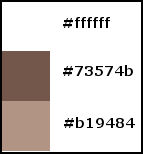
Colors:
Paint the image white
Selections / Select all
Copy the female tube
Paste it into the selection
Select none
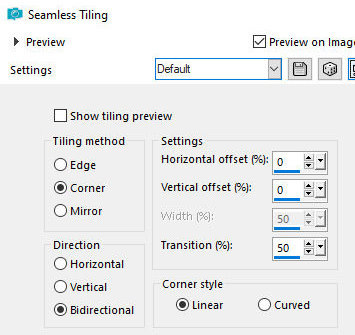
Effects / Image Effects / Seamless tiling - default
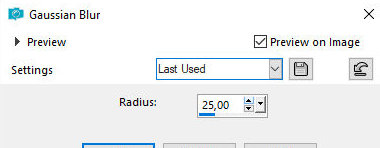
Adjust / blur / Gaussian Blur: 25
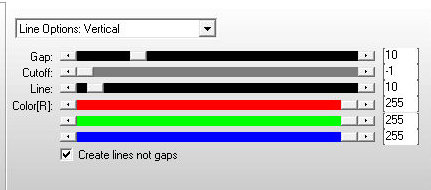
Effects / Plugins / Ap [Line] / Silver-Lining
Add a new layer
Selections / Select all
Copy the [roses] tube
Paste it into the selection
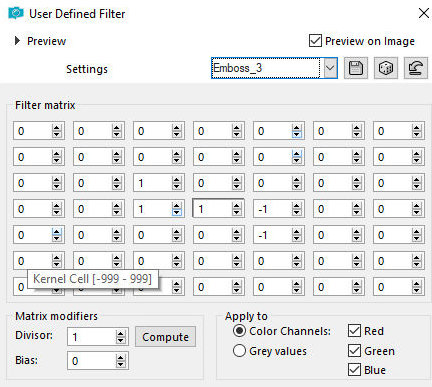
Effects / User Defined Filter / Emboss 3
Blend: Multiply
Select none
Add a new layer
Selections / Select all
Copy the [sprayed] tube
Paste it into the selection
Opacity: 55
Select none
Activate layer Rster 1
Layers / Duplicate
Layers / Arrange / Bring to Top
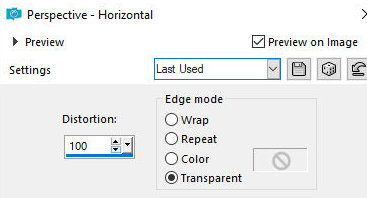
Effects / Geometric Effects / Perspective Horizontal - 100/Transparent
Image / Mirror / Mirror Horizontal
Effects / Geometric Effects / Perspective Horizontal - 100/Transparent
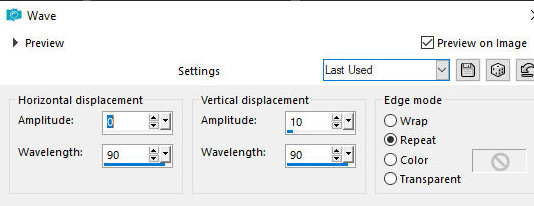
Effects / Distortion Effects / Wave
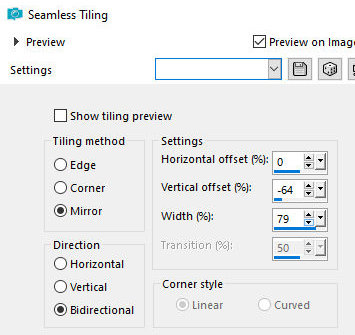
Effects / Image Effects / Seamless Tiling
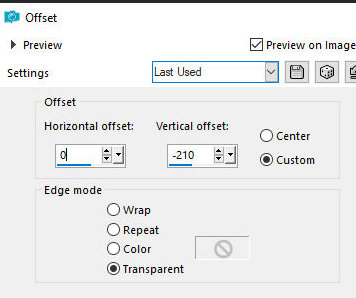
Effects / Image Effects / Offset (0/-210)
Drop Shadow: 1 1 100 1 #73574B
Copy the female tube
Paste as a new layer
Image / Resize: 65% - all layers unchecked
Position as per model
Copy the text
Paste as a new layer
Position as per model
Border: 2px/ #b19484
Border: 40px / white
Select this 40px border with Magic Wand (tolerance/feather=0)
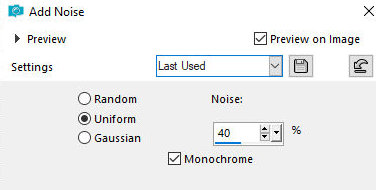
Adjust / Add / Remove noise / Add Noise
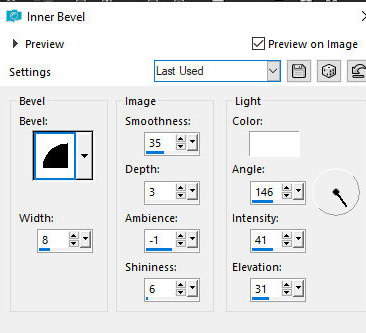
Effects / 3D Effects / Inner Bevel
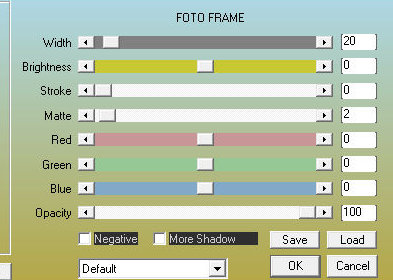
Effecta / Plugins / AAA Frames / Photo Frame
Border: 2px / #b19484
Select none
Add signatures
Merge all
Save as jpeg

|