|
You will need
1 female tube
* Open the alpha channel file [Beácska
PSP IMAGE fáj] / duplicate (shift+d) / Close the
original
Layers / Duplicate
Original Colors:
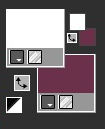
Paint the top layer white and the bottom layer #6e324b
Top layer activated
Layers / New Mask layer / From Image / Mask
[TLkLM4NAE6jONIFT7_Vl8REmLMo]

Merge Group
Top layer activated
Effects / Reflection Effects / kaleidoscope
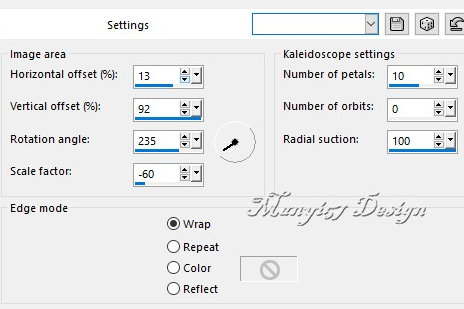
Effects / User Defined Filters / Emboss 3

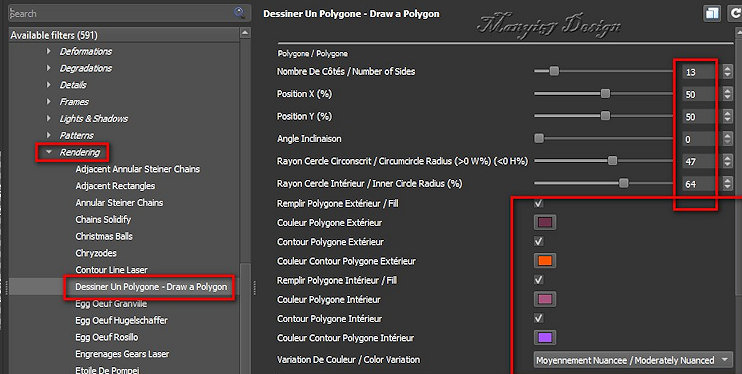
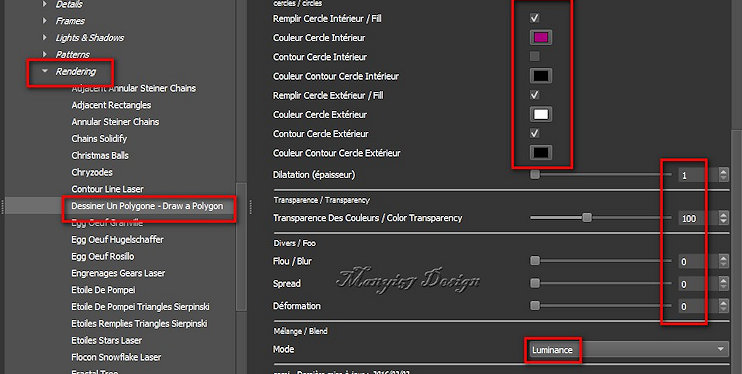
Effects / Plugins / GMIC-QT / Testing / Samj / Rendering
- Dessener Un Polygone - Draw a Polygon
Colors: #6e324b - #ff5600 - #ae537f - #a257fc
Colorize with a color that matches your colors
Effects / Reflection effects / Rotating Mirror

Selections / Load selections from alpha channel /
Selection 1
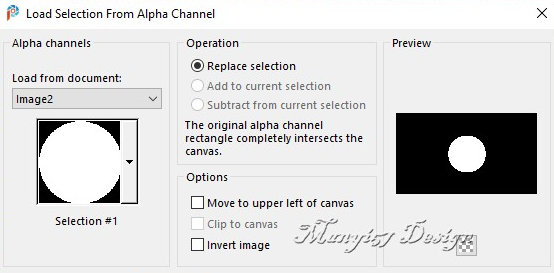
Add new layer
Effects / Plugins / Eye Candy5: Impact / Glass

Select none
border: 60px / #ffffff
Add new layer
Effects / Plugins / GMIC_QT / Testing / Samj / Frames /
At06B 2017 Frame Painting

Layers / Duplicate
Duplicate layer activated
Edit/Cut (a copy will remain in memory)
Selections / Select all
Selections / Modify / Contract

Paste the image from memory into the selection
Select none
Layers / Arrange / Move Down
Copy the female tube
Paste as a new layer
Adjust the size to 427x595px
Position where Prefer or:
Activate the Pick Tool and configure: X=10 - Y=16

Adjust / Sharpness / Sharpen
Drop Shadow: 0 0 60 30 color #371926 or according to
your image
Merge visible
Image / Resize: 950x601px (optional)
Add signatures
Merge all
Save as jpeg |