|
Você precisará de :
1 tube feminino
1 tube decorativo
*
Coloque as seleções na pasta Selections do PSP
*
Etapa 1
Cores originais
Abra uma nova imagem transparente com
800x600px
Selections / Select all
Copia a imagem [sfondo]
Cole na seleção
Adjust / blur / Gaussian Blur: 20
Select none
Effects / Plugins / Unlimited 2 / BKG Designer sf10 IV /
Blue Berry Pie
Etapa 2
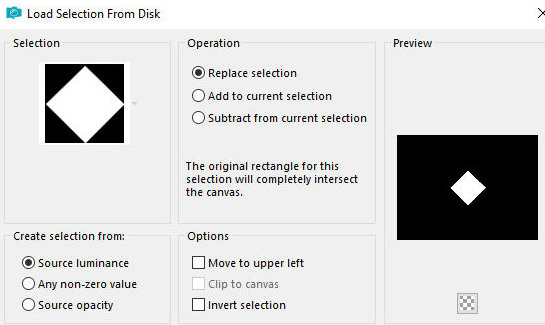
Selections / Load seelction from disk / Selection [#1-FL-LV25]
Selections / Promote selection to
layer
Effects / plugins / penta.com / Color dot
[145 10 255 255 255]
Select none
Drop shadow: 0 0 85 20 preto
Layers / Duplicate
Image / Mirror / Mirror horizontal
Merge down
Etapa 3
Ative a layer Raster 1
Layers / Duplicate
Layers / Properties / Blend Mode: Screen
Effects / Plugins / Unlimited 2 / BKG Designer sf10 IV -
Blue Berry Pie
Effects / edge Effects / Enhance
Etapa 4
Selectins / Load selection from disk / Selection
[#2-FL-LV25]
Adicione nova layer
Pinte a layer com a cor #d15161
Effects / Plugins / AP [Lines] / Silverlining
[8 -4 10 0 0 0 - line options vertical]
Selections / Modify / Expand: 25
Ative a layer abaixo
Selections / Promote selection to layer
Ative a layer Raster 2
Merge down
Select none
Drop shadow: 8 0 85 20 preto
Layers / Duplicate
Image / Mirror / Mirror Horizontal
Merge visible
Layers / Duplicate
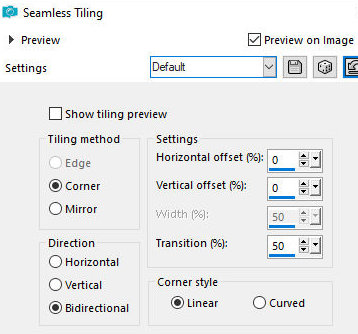
Effects / Image effects / Seamless Tiling - default
[default]
Layers / Properties / blend Mode: Hard
Light
Etapa 5
Layers / Duplicate
Effects / Plugins / Mura's meister / Perspective Tiling
[80 0 0 20 0 0 100 255]
Layers / Properties / Blend Mode:
Normal
Drop Shadow: 0 0 65 20 preto
Selections / Load selection from disk / Selection [3-FL-LV25]
Ative a layer merged
Adjust / Blur / Gaussian Blur: 8
Ative a layer Copy of merged
Adjust / Blur / Gaussian: 8
Select none
Etapa 6
Continue na layer Copy of Merged
Selections / Load selection from disk / Selection [1-FL-LV25]
Selections / Promote selection to
layer
Select none
Layers / Arrange / Bring to top
Effects / Image Effects / Offset
[400/0]
Layers / Duplicate
Image / Mirror / Mirror Horizontal
Merge down
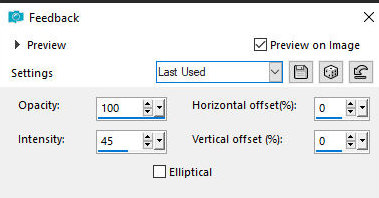
Effects / Reflection Effects / Feedback
[100 45 0 0 des]
Layers / Properties / blend mode: Hard
Light (ou outro de acordo com suas cores)
Etapa 7
Copie o tube [DecoroRombi]
Cole como nova layer
Ative a Pick Tool e configure: X=186 - Y=324 - Pressione
M
Se preferir colorize com as cores
usadas usando o método que preferir
Adicione nova layer
Selections / Load selection from disk / Selection [4-FL-LV25]
Coloque a cor #6a358b no foreground e
a cor #ef3349 no background
Prepare um gradiente Linear
[45 0 des]
Pinte a seleção com este gradiente
Select none
Effects / 3D Effects / Inner Bevel
[bv 2 11 25 8 0 0 br 315 50 30]
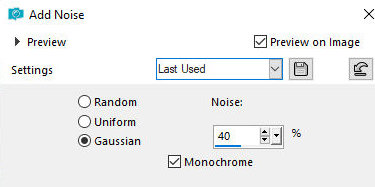
Adjust / Add/Remove Noise / Add Noise
[gaussian 40 x]
Layers / Duplicate
Image / Mirror / Mirror horizontal
Image / Flip / Flip horizontal
Merge Down
Drop shadow: 2 4 75 5 preto
Selections / Load selection from disk / Selection [5-FL-LV25]
Adicione nova layer
Pinte a seleção com a cor #1c2144
Effects / plugins / Penta.com / Color Dot - igual
anterior
Repita o Color dot
Drop shadow: 0 12 65 20 preto
Drop Shadow: 0 -12 65 20 preto
Select none
Copie o tube [libri_LV]
Cole como nova layer
Posicione embaixo à esquerda conforme modelo
Drop Shadow: 0 0 55 25 preto
Copie o tube [1022-TD(AILValella25)]
Cole como nova layer
Posicione à direita conforme modelo
Drop Shadow: 0 0 55 25 preto
Copie o título [TitoloB] ou [titoloN] (conforme suas
cores)
Posicione conforme modelo ou como preferir
Etapa 9
Bordas:
2px / preto
5px / #ef3349
15px / #6a358b
5px / #ef3349
Selections / Select all
Borda: 35px / qualquer cor
Effects / Image Effects / Seamless Tiling - default
[default]
Selections / invert
Adjust / Blur / Gaussian Blur: 15
[15]
Effects / Plugins / AP [Lines] /
SilverLining
[10 -1 10 000 line options vertical]
Effects / Plugins / penta.com / Color
Dot
[145 7 255 255 255]
Repita o Color Dot
Selections / Invert
Drop Shadow: 5 5 75 15 preto
Drop Shadow: -5 -5 75 15 preto
Select none
Bordas:
5 px / #ef3349
2 px / #000000
Coloque as assinaturas
Merge all
Salve como jpeg
|